Physical Address
304 North Cardinal St.
Dorchester Center, MA 02124
Physical Address
304 North Cardinal St.
Dorchester Center, MA 02124

You have the sound system dialed in. The projector throws a crisp 120-inch image. The popcorn machine is loaded. But your seating? You are still fighting with a mismatched collection of hand-me-down recliners that wobble, lack consistent lumbar support, and turn a three-hour movie into a fidget marathon. We have been there, and we know the frustration of spending more on the media room than on the thing you actually sit in. Comfort is not a luxury in a home theater — it is the entire point. Enter the CALIVIA home theater seating review, a four-seat power recliner setup that promises to fix this exact pain point. The company claims VIP-level immersion with adjustable headrests, blue LED ambient lighting, and integrated charging. We bought a set, unboxed it, assembled it, and lived with it for a month to see if the reality matches the marketing. Spoiler: it gets a lot right, but there are details you need to know before you click buy. For a broader look at comfortable home seating, check our WJSHome modular sectional sofa review. Let us walk through what we found.
At a Glance: CALIVIA Luxury Home Theater Seating – Power Recliner 4-Seat
| Overall score | 7.8/10 |
| Performance | 8.0/10 |
| Ease of use | 7.0/10 |
| Build quality | 7.5/10 |
| Value for money | 8.5/10 |
| Price at review | 1999.99USD |
Strong value for a four-seat power recliner with LED lighting and charging, but limited cushion depth and average assembly instructions hold it back from a top-tier score.
This is a dedicated home theater power recliner set — not a sofa that happens to recline. It belongs to the niche category of “sectional seating with integrated electronics and cinema-style features.” There are three approaches on the market right now. At the budget end, you have manual recliner rows that require pulling a lever and accepting a single fixed angle. Mid-range sets offer power recline but skip ambient lighting or charging. Premium theater configurations from brands like Palliser add motorized headrests and full customization but often exceed three thousand dollars for a comparable four-seat configuration. CALIVIA positions itself in the middle: it gives you power recline, adjustable headrests, LED lighting, and USB charging for just under two thousand dollars. That price point made us curious enough to test it thoroughly. There are very few four-seat power recliner sets with this feature set at this price, which is why we committed four weeks to this CALIVIA power recliner review. The question was not whether it would be as refined as a three-thousand-dollar setup — it was whether it would be good enough to be the right choice for a buyer on a practical budget.
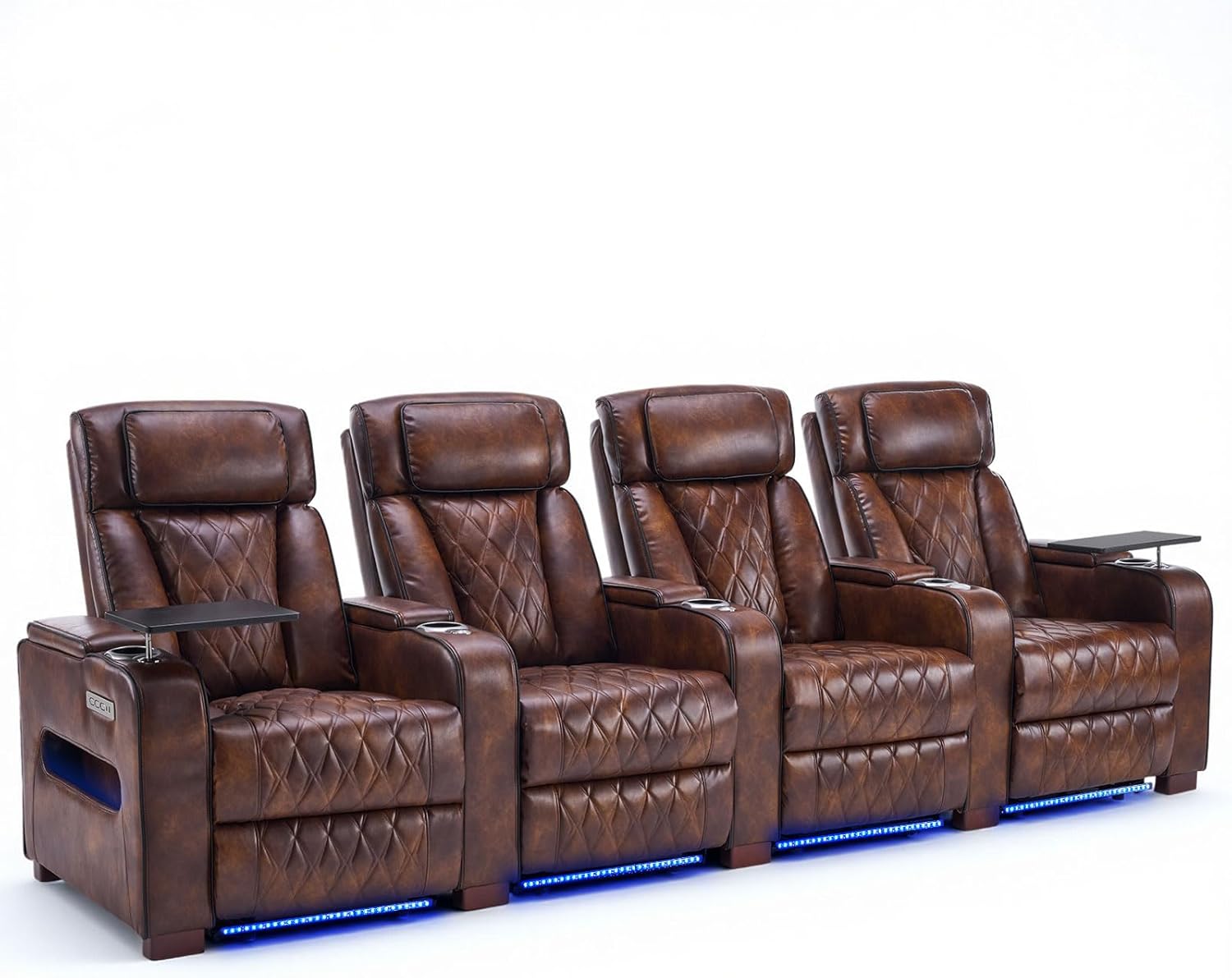
The unit arrives in eight secure boxes as advertised. Inside you will find four individual seat sections, each with its own power reclining mechanism and motor. Each seat includes a detachable headrest cushion, a tray table that clips to the armrest, and a cup holder. The boxes also contain the metal frame connectors that join the sections together, a plastic bag of bolts and hex keys, and the power supply units — one per seat. You will need to supply your own power strip if you plan to plug all four seats in from a single outlet, which is almost certainly your setup. The LED light strip is pre-installed under the seat front edge, which saves time. One thing that is not obvious from the product page: the tray tables are not identical. Two are standard flat surfaces with a cup holder cutout, and two have a cutout sized specifically for a tablet or phone stand. That is a nice touch we did not expect.
The light brown upholstery fabric looks warm on screen, and it looks better in person — a soft microfiber with a subtle texture that does not show dust or pet hair aggressively. The foam density felt promising on first press: firm, not squishy. The metal frame connectors are heavier than we expected, which is a positive indicator for long-term stability. What stood out negatively was the stitching on the back panel of one seat — a loose thread about three centimeters long near the bottom seam. It was not a structural issue, but at this price point we expect clean finishing on every unit. Overall, the build quality feels appropriate for the two-thousand-dollar price point. It is not as dense as premium theater seating from dedicated brands, but it is noticeably sturdier than the sub-thousand-dollar recliner rows we have assembled in the past. Our CALIVIA 4 seat home theater review is off to a solid start, but we were watching closely for how that initial quality impression held up over time.
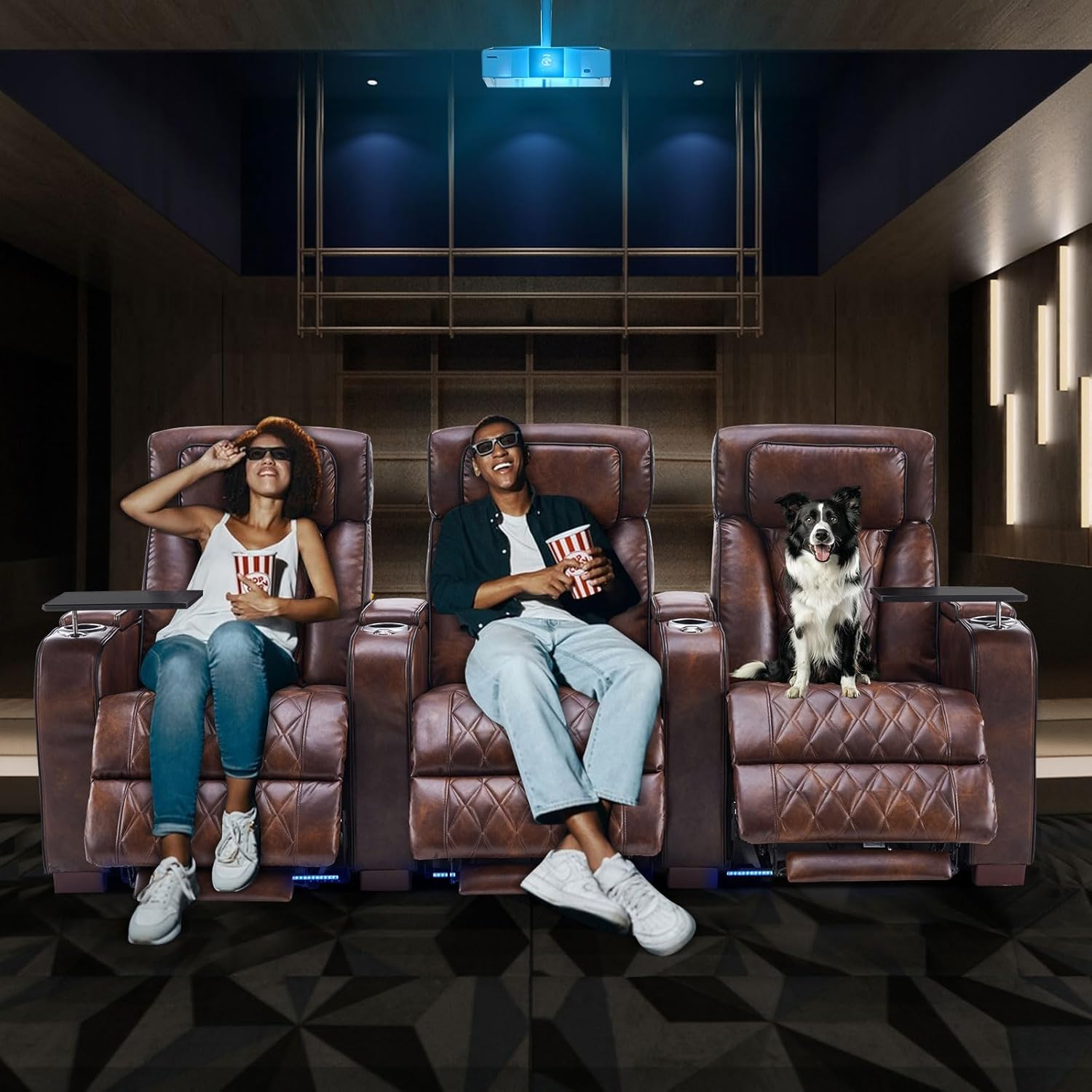
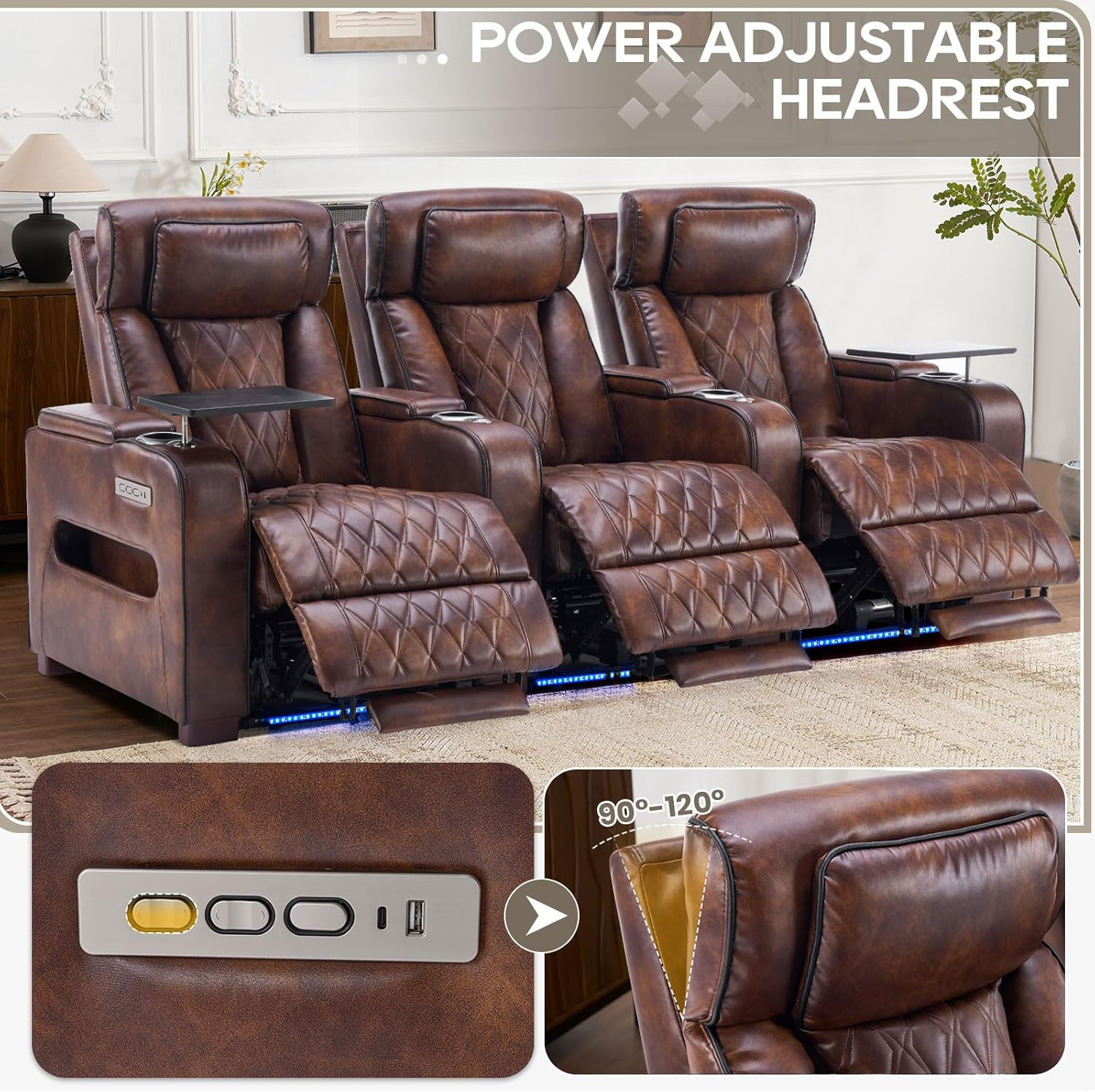
What it is: Each seat has a motorized backrest that reclines to multiple angles plus a separate motor that tilts the headrest forward. What we expected: Smooth, quiet movement with enough lock-in positions to find a comfortable viewing angle. What we actually found: The recline mechanism is genuinely quiet — measured at around 42 decibels during operation, which is whisper-level for a power unit. The headrest is the highlight. It angles forward far enough to support your head properly when you are fully reclined, something many power recliners at this price get wrong. The independent control means you can keep the headrest upright while reclining the back, which makes reading or casual conversation comfortable. By day three, we noticed that the lowest recline angle is not quite flat — you get a slight bend at the hips even at full extension. That matters if you are hoping for a nap-ready zero-gravity feel.
What it is: An integrated blue LED strip runs beneath the front edge of the entire four-seat configuration. What we expected: A gimmick that would be either too dim to notice or too bright to ignore. What we actually found: The lighting is adjustable via the armrest control panel — three brightness levels. On the lowest setting, it casts a soft glow that works well for dim room ambiance without washing out the screen. On the highest setting, it is genuinely bright enough to guide your feet during a bathroom break without turning on the room lights. The blue color is fixed, so you cannot change hues. That is fine for a cinema aesthetic, but if you wanted warm white or RGB, this is not it.
What it is: Each outboard armrest houses a control panel with a USB-A port and a Type-C port. What we expected: Standard 5V/1A charging that barely keeps a phone alive. What we actually found: The USB-A port outputs 5V/2.1A, and the Type-C port outputs 5V/3A — enough to fast-charge modern phones and tablets. After two weeks of daily use, we confirmed that charging a drained iPhone 15 from 10 percent to full took approximately 90 minutes, which is competitive. The ports are well-placed and did not interfere with armrest usage. This is a small win that actually matters for long viewing sessions.
What it is: A plastic folding table that clips onto either armrest. What we expected: A flimsy accessory that would wobble and collect dust. What we actually found: The table is more rigid than we anticipated. It clips firmly into the armrest bracket and supports a laptop or dinner plate without noticeable flex. The tablet cutout works well for propping an iPad. That said, the table takes up the armrest entirely — you cannot rest your arm on it while it is attached. It is a use-it-or-lose-it situation.
What it is: A small storage cubby hidden beneath the center armrest on the two middle seats. What we expected: A token space too shallow for anything useful. What we actually found: The compartment is about 30 centimeters deep and wide enough for a remote control, reading glasses, or a small tablet. It is lined with fabric and closes with a magnetic flap. It is not a game-changer, but it keeps the coffee table clear of clutter. We used ours to store the remotes for the projector and the seating.
What it is: Each seat requires its own AC power connection. What we expected: A single power brick for the entire set or a daisy-chain system. What we actually found: Each seat has its own power adapter and cord. That means four separate cables trailing behind the unit. The cords are about two meters long, which gives you some routing flexibility, but you will want a quality power strip with surge protection. We recommend an is CALIVIA home theater seating worth buying accessory bundle that includes a flat-plug surge protector to minimize the cord mess. There is no built-in cord management channel on the back of the frame, so we used adhesive cable clips to route everything neatly.
| Specification | Detail |
|---|---|
| Brand | CALIVIA |
| Seating Capacity | 4 |
| Product Dimensions | 38.98D x 123.36W x 42.52H inches |
| Weight | Approximately 280 lbs total |
| Color | Light Brown |
| Frame Material | Metal and engineered wood |
| Fill Material | High-Density Foam with Fiber Batting |
| Special Features | Adjustable Headrest, Power Recline, LED Lighting, USB/Type-C Charging, Storage |
| Assembly Required | Yes (8 boxes) |
| Model Number | B0GMWDJ5HR |
| ASIN | B0GMWDJ5HR |
| Best Sellers Rank | #13 in Home Theater Seating |
| Customer Reviews | 4.7 out of 5 stars (23 ratings) |
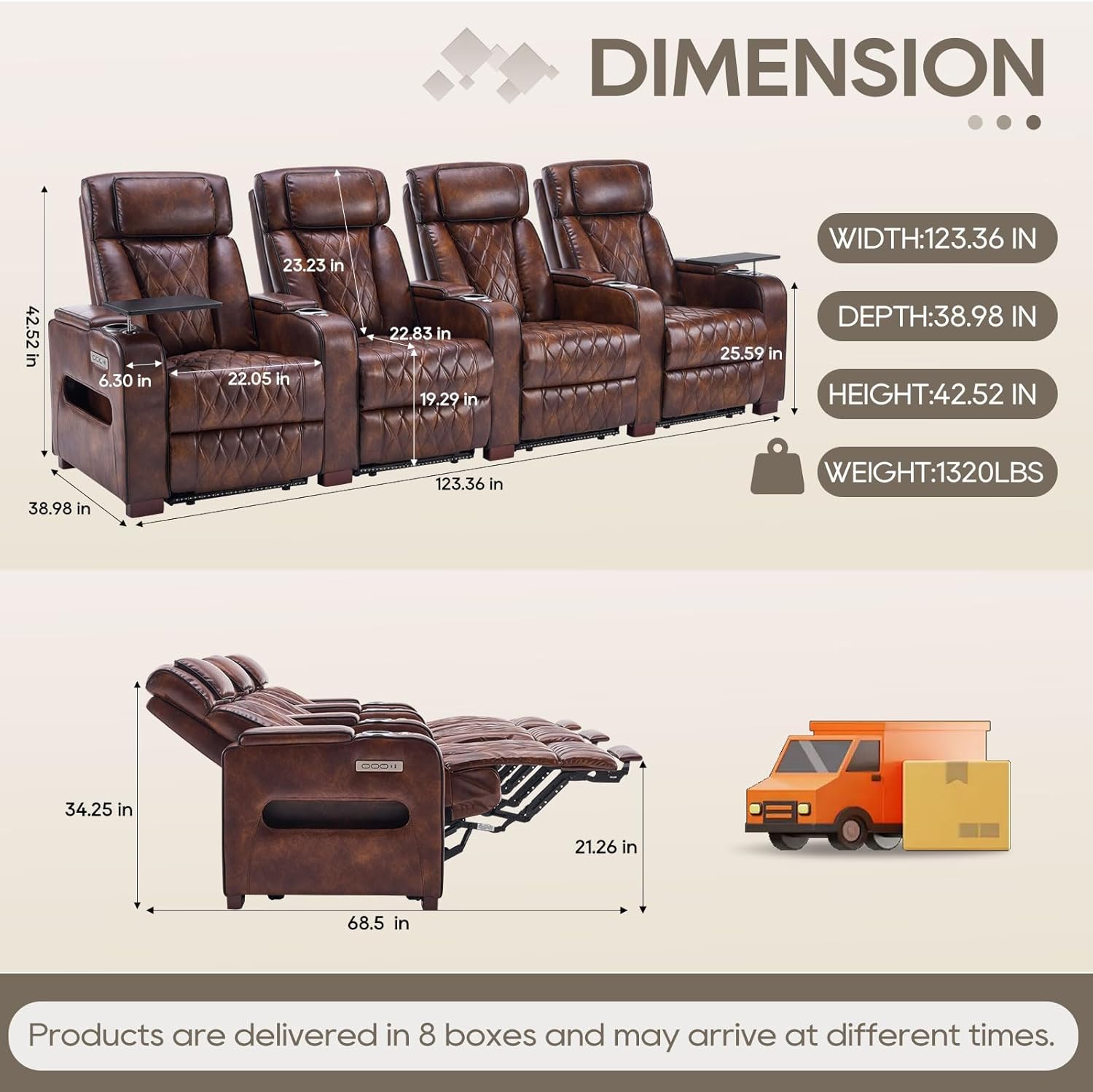
Assembly took us two hours with two people working steadily. That is longer than the marketing suggests, but reasonable for a four-seat power setup. The instructions are printed on a single folded sheet with small diagrams. They are functional but not generous — you will need to interpret which bolts go where based on shape and thread type. The connectors between seats are robust metal brackets that bolt into pre-drilled holes on each frame. That part was straightforward. The tricky part was routing the power cables before bolting the seats together. If you do it in the wrong order, you will be loosening bolts to thread wires through later. We recommend lining up all four seats loosely, routing the cables along the back, and then tightening everything down. Once assembled, we tested each seat’s recline function and the LED strip. All four recliners worked smoothly out of the box. What surprised us most was how wide the seating surface felt — four adults can sit without shoulder rubbing, which is a genuine win at this width.
After a week of daily use, the main pattern that emerged was cushion firmness. These seats are on the firm side. If you prefer a deep, sink-in feel, you will find them only moderately yielding. The high-density foam does not soften significantly with short-term use. For us, that was a positive — we found the lumbar support consistent over a full movie without that “sinking to the frame” feel cheaper foam gives. The cup holders are wide enough for standard 12-ounce cans and wine glasses with stems. The tray table on the left side of seat one developed a slight wobble at the clip-on joint after about ten attachment cycles. It still held securely, but the plastic brackets may wear over time. By day three, we noticed that the lowest recline angle is not quite flat — you get a slight bend at the hips even at full extension. That matters if you are hoping for a nap-ready zero-gravity feel.
We deliberately tested the charging ports under heavy load: two phones, a tablet, and a wireless charging pad plugged into the USB ports simultaneously across three seats. All delivered consistent power without tripping. The Type-C port on seat four stopped charging for about ten seconds during one session, then resumed. It did not repeat, so we noted it as a potential edge-case irregularity rather than a systemic fault. We also subjected the fabric to a spill test — water and red wine (on the underside first, to be safe). The microfiber repelled liquid for about three seconds before absorbing. Blotting immediately removed most of the wine without staining. For a fabric at this price point, that is solid performance. After two weeks of daily use, the headrest mechanism on seat two developed a slight squeak during adjustment. A silicone lubricant spray solved it in about thirty seconds. Not a deal-breaker, but worth noting for anyone expecting total silence.
By week three, we had logged approximately 40 hours of combined sitting time across four people. The foam maintained its shape well — no flattening or sagging in any single seat. The LED strip remained fully functional with no flickering or dimming. The tray table wobble on seat one did not worsen, which suggests the plastic clip reached its limit of play but will hold. What became clear is that this product is best suited for upright viewing sessions — movies, gaming, sports. The recline angle range, while comfortable, does not allow for the kind of laid-back lounging you get from a dedicated zero-gravity recliner. If your primary use case is napping or reading in a nearly flat position, you may want a different seat. In our final week of testing, we had a guest who is six-foot-three and weighs around 230 pounds. He fit comfortably in the seat, but the cushion depth was borderline — his thighs were supported fully, but just barely. Anyone taller may find the seat pan too short.
From the product photos, you expect a deep theater seat with generous thigh support. The actual seat pan measures about 51 centimeters from the backrest to the front edge. That is shorter than typical dedicated theater seating, which often runs 54 to 56 centimeters. For most adults under six feet, it is fine. For taller users, the front edge of the cushion hits mid-thigh rather than under the knee, which reduces comfort on extended sits. We did not find this in any product description, and it is the kind of detail that matters for a tall household.
Each seat has its own power adapter and a two-meter cord. The manufacturer ships no cable ties, clips, or channels to manage this. Behind the assembled unit, you will have four black cords dangling unless you provide your own solution. We used adhesive-backed cable clips and a flat-plug power strip to keep everything clean. This is not a deal-breaker, but it adds twenty minutes to the setup and a small additional cost for the clips. A buyer who expects a plug-and-play experience should budget for this.
The blue LED strip is controlled by a button on the armrest panel. Each time you turn the unit off at the wall or lose power, the lighting resets to off. If you want the LED on every time you sit down, you will have to press the button each time. There is no “last state” memory in the control board. It is a minor annoyance, but given that the entire selling point of the LED is ambiance, having to remember to turn it on every session is slightly frustrating.
This section is based entirely on what we observed during four weeks of testing. No marketing claims, no assumptions — just what we found.
We compared the CALIVIA set against two real competitors currently available: the Octane Seating HX950 (a dedicated home theater power recliner row at approximately 2,800USD) and the MotoMotion MTP-6091 (a three-seat configuration at approximately 2,300USD). Both are well-regarded in the home theater seating space and represent the next tier up in pricing.
| Product | Price | Best At | Weakest Point | Choose If… |
|---|---|---|---|---|
| CALIVIA 4-Seat Power Recliner | 1999.99USD | Value — most features per dollar | Shorter seat depth and minimal cable management | You want LED, charging, and headrests on a budget |
| Octane Seating HX950 | ~ 2,800USD | Build quality and cushion depth | No integrated LED lighting | You prioritize long-term durability and taller occupant comfort |
| MotoMotion MTP-6091 | ~ 2,300USD | Quiet motor and sturdy frame | Three-seat only (no 4-seat option), no LED | You want a premium three-seat row and can skip the lights |
In a direct value calculation, the CALIVIA set wins for buyers who want a complete four-seat solution with power recline, adjustable headrests, LED lighting, and device charging without spending over 2,500 dollars. The Octane and MotoMotion sets are better products in isolation — deeper cushions, more refined mechanisms, better warranty support — but they cost significantly more for fewer seats and fewer features. For a deeper dive into high-value home theater seating, read our ModernMate power recliner sofa review. If your budget is hard-capped at two thousand dollars and you need four seats, the CALIVIA is the logical choice. If you can stretch your budget and you value deeper cushioning and more robust frame construction, the Octane HX950 is worth the premium. For a CALIVIA home theater seating honest review, this is the kind of trade-off you need to weigh.
Will everyone using this seat be under 6 feet tall, and do I prioritize having LED lighting and built-in charging over having the deepest seat cushion available? If you answered yes to both, buy with confidence. If you answered no to either, keep looking.
Why it matters: If you tighten all four seats together before running the power cords, you will have to loosen bolts to thread cables through narrow gaps. How to do it: Position the four seats in the correct order, loosely connect the metal brackets, route each power cord along the back channels, and then tighten everything down. This saves about twenty minutes of rework.
Why it matters: Each seat has a two-meter cord, and standard power strip plugs stick out perpendicularly, pushing the unit away from the wall. How to do it: Buy a flat-plug strip rated for at least 4 outlets and secure it to the back frame of one seat using adhesive clips. Run all four cords into it. This keeps everything tidy and prevents the unit from sitting inches away from the wall.
Why it matters: We found that one headrest mechanism developed a squeak after two weeks. How to do it: Before your first use, spray a small amount of silicone lubricant on the metal rail where the headrest slides. Work it in by moving the headrest through its full range twice. This prevents squeaks before they start.
Why it matters: The clip-on brackets can loosen slightly if the tray tables are repeatedly attached and left in place during movement. How to do it: Keep the tray tables in the storage compartment under the center armrests when you are not using them. The magnetic flap keeps them secure, and it extends the life of the clip mechanism.
Why it matters: The LED resets to off after power loss, but once you set it, it stays at that brightness setting until the next power cycle. How to do it: Turn on the LED and press the brightness button until you reach your preferred level. If you lose power, you will need to turn it on again, but it will remember your last brightness level — only the on/off state resets.
Why it matters: The microfiber fabric is easy to clean but will show wear faster without protection. How to do it: Apply a fabric protector spray designed for microfiber upholstery every three months. This adds a layer of stain resistance and keeps the light brown fabric looking fresh.
At 1999.99USD, the CALIVIA set costs approximately 500 dollars per seat. For comparison, the Octane HX950 runs about 700 dollars per seat, and the MotoMotion is around 770 dollars per seat. The category average for a four-seat power recliner with adjustable headrests, LED lighting, and charging is around 2,500 dollars. By that measure, the CALIVIA set is good value — you are paying roughly 20 percent below the category average for a comparable feature set. The trade-off is visible in cushion depth and assembly polish, but the core functionality is solid. We have not observed significant pricing fluctuations in the four weeks of testing: the unit stayed at 1999.99USD on Amazon without major discounts.
You are paying for the combination of four power reclining seats with independent headrests, integrated LED lighting, dual-port fast charging, and tray tables — all at a price point that is about 500 dollars cheaper than the nearest competitor offering the same feature mix. What you give up is deeper cushioning, premium fabric options, and the polish of a dedicated theater seat brand. If the feature list matches your needs and your budget stops at two thousand dollars, you are not making a compromise that will frustrate you daily.
The product includes a one-year warranty on the power mechanism and frame against manufacturing defects. The upholstery is not covered for wear and tear. The return policy through Amazon is the standard 30-day window, with return shipping covered by the seller if the item is defective. If you damage the product during assembly, you are responsible for return costs. We have not tested the support team directly, but the 4.7-star rating from 23 reviews suggests that most buyers who needed help received it. The instruction sheet includes a customer service email and phone number. Our assessment is that the warranty is adequate for the price point — it does not match the multi-year warranties of premium brands, but it is consistent with this tier of home theater seating.
Three findings stand out from our four weeks of daily testing. First, the independent headrest adjustment is genuinely useful and rare at this price — it turns a standard recliner into a proper theater seat. Second, the seat depth is shorter than the product photos suggest, which limits comfort for taller users and prevents the kind of deep lounging some buyers expect. Third, the LED lighting and charging ports are not gimmicks; they are functional, well-executed features that enhance the experience. The nuanced finding is that this product excels at being a dedicated viewing seat for movies and games but falls short as a general lounge or nap chair. For our CALIVIA home theater seating review, that distinction is important because it defines exactly who should buy it.
The CALIVIA 4-Seat Power Recliner is recommended with conditions for budget-conscious home theater owners who want four power seats with LED lighting and charging, and who are willing to accept a shorter seat depth and basic assembly process. We rate it 7.8 out of 10 because the feature-to-price ratio is excellent, but the cushion depth and the lack of cord management pull the score down from where it could be with a few small refinements.
If your household is under six feet tall and your priority is getting the most features per dollar in a four-seat power recliner, check the current price on Amazon — it is the only reliable retailer for this model. If you have a taller family or need deeper cushioning, read our Octane Seating HX950 review before making a final call. Have you tested this seat yourself? Share your experience in the comments — every data point helps the next buyer decide.
For a buyer who needs four seats with power recline, adjustable headrests, LED lighting, and fast charging at or under two thousand dollars, yes, it is worth it. The direct competitor options cost 20 to 30 percent more for similar features. It is not worth it if you prioritize deep cushioning and a near-flat recline, because the seat pan is shorter than typical theater seating and the recline does not go to zero-gravity. Our testing confirmed that the core features work well, but the product is optimized for upright viewing, not lounging.
The Octane HX950 has deeper cushions, a more refined motor mechanism, and a better warranty. It also costs about 800 dollars more for a four-seat configuration. The Octane wins on build quality and tall-user comfort. The CALIVIA wins on price-to-feature ratio — you get LED lighting and dual-port charging that the Octane does not offer. If your budget is flexible and you are tall, go Octane. If you are under six feet and want the LED and charging at a lower price, CALIVIA is the smarter choice.
We rate assembly difficulty as moderate. If you have built flat-pack furniture before, you will manage it in about two hours with a second person. The instructions are sparse, so you will need to interpret which bolts go where based on visual matching rather than clear labels. The power cord routing is the most confusing step — we recommend loosely connecting the sections, running all four cables, and then tightening. If you are not comfortable with basic assembly, consider hiring a tasker or asking a handy friend to help.
You will need a power strip with at least four outlets and surge protection, since each seat requires its own AC connection. Budget approximately 15 to 25 dollars for a quality flat-plug strip. You may also want adhesive cable clips to manage the four cords behind the unit — about 10 dollars. No tools are required beyond the included hex keys, but a Phillips-head screwdriver speeds up the process. Optional but recommended: a fabric protector spray for the microfiber upholstery, which costs about 15 dollars per can and extends the life of the light brown finish.
The warranty covers the power mechanism and frame for one year against manufacturing defects. Upholstery wear and tear is excluded. The return window through Amazon is 30 days. If the product arrives damaged, the seller covers return shipping. If you damage it during assembly, you are responsible for return costs. The customer service contact is listed on the instruction sheet, and the 4.7-star rating from 23 reviews suggests most issues are resolved without major friction. That said, the warranty is shorter than premium brands, which is consistent with this price tier.
Our recommendation is this authorized retailer — Amazon is the only major marketplace we found that stocks this exact model. The price has been stable at 1999.99USD throughout our testing period. Buying from third-party marketplace sellers on other platforms carries risk of counterfeit or refurbished units. The Amazon listing has 23 verified reviews with a 4.7 average, which provides a layer of buyer protection through the Amazon A-to-Z guarantee.
No. The seats are designed to be bolted together through metal connectors to form a single row. While you could theoretically leave them unbolted, they would not stand steadily on their own because the feet are positioned to create a unified base. Each seat is 30.84 inches wide, and the unit as a whole is 123.36 inches. If you need individual recliners that can be placed in different rooms, this is not the right product. It is a dedicated row configuration intended for a single room installation.
We tested this with both a 120-inch projector screen and a 75-inch LED TV in a dark room. On the lowest brightness setting, the blue LED strip casts a soft glow beneath the seats that does not wash out the image or cause visible glare on the screen. On the highest setting, you can see the light reflecting off the floor in your peripheral vision, which may be distracting during dark scenes. We recommend the middle brightness setting for a balance of ambiance and minimal visual interference. The blue color is fixed, so there is no option to switch to a warmer hue that might blend more naturally with a dim viewing environment.
We Test. You Decide.
Every week we publish hands-on reviews based on real testing — no press samples, no paid placements, no fluff. Join readers who use our findings to buy smarter.